Drupal's AI-Native Page Building: Canvas + AI Context + Canvas AI Working Together

There's turbulence in CMS land. Cursor chose pure markdown over Sanity - a signal worth paying attention to. The idea that AI agents could replace the CMS entirely is enticing but unrealistic. As AI-generated content floods the web, non-technical users will need better tooling to create original, on-brand content with speed and precision. Content originality and unique branding are going to matter more than ever, not less.
This brings us to context. ChatGPT and Claude build profiles of you as you chat and you expect them to remember what you said. But with your CMS, you're still copying and pasting content between tools, massaging prompts, starting from scratch every time. The workflow is broken. This post walks through how to build unique content, on brand, right in the CMS - without starting fresh each time.
I've written about Canvas fundamentals and AI quick wins before and those remain good references. Instead, this is about connecting the dots and letting an AI agent build your pages with full knowledge of your brand, your audience, and your design system.
I'm currently rebuilding my agency site using three pillars: Canvas, AI Context, and Canvas AI. Here's exactly how it works, what context I provided, and what it costs.
I'm using Dripyard as my base theme since it provides out-of-the-box components with AI context and metadata already attached.

The Three Pillars of AI-Native Page Building in Drupal
Before diving into the workflow, let's understand what each piece brings to the table:
- Canvas provides the visual builder and component architecture
- AI Context provides the intelligence layer - brand knowledge, tone, guidelines
- Canvas AI provides the agent that turns prompts into pages (submodule of drupal canvas)
Together, they create a page builder that actually understands your brand.
Pillar One: Canvas (The Builder)
Canvas is Drupal's modern visual page builder. It hit stable release in November 2025 and becomes the default page builder in Drupal CMS 2.0 from January 2026. If you've followed my previous posts, you will get the gist - component-based architecture using Single Directory Components (SDCs), drag-and-drop editing, slots for composition.
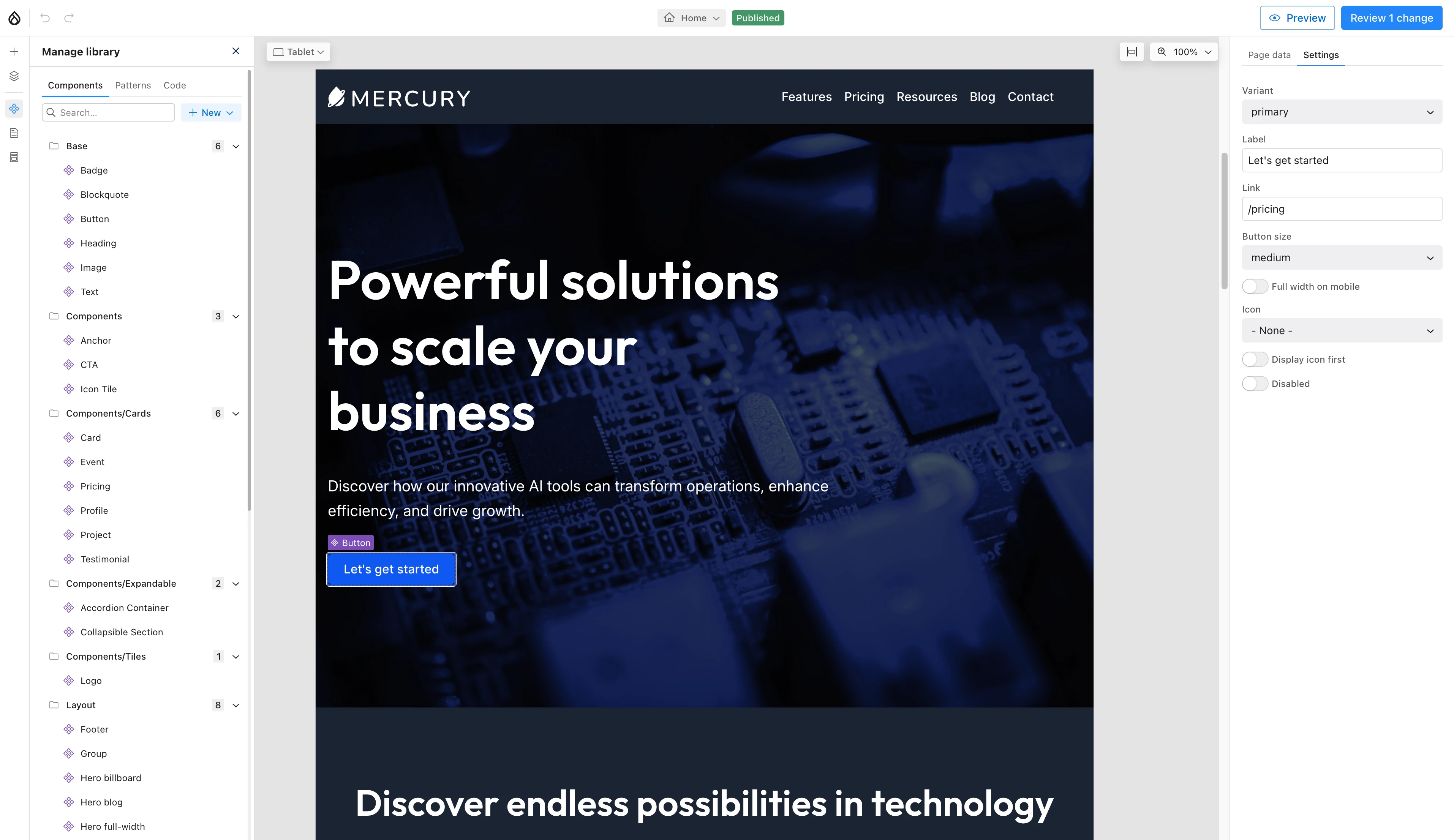
With AI, Canvas acts as the surface where AI agents operate. The component library - your hero sections, cards, CTAs, flexible sections - becomes the sections that AI can understand.
For decision makers, Canvas means editors build pages without developer tickets. Design consistency is enforced by components instead of personal opinion.
For technical readers, Canvas uses SDCs with JSON Schema props. Those schemas aren't just for validation - they're the interface that AI agents use to configure components correctly. The better your component schemas, the better your AI-generated pages.
I've covered Canvas deeply in 5 Drupal Canvas Tips and Building a Custom Hero Component. For this post, what matters is understanding that Canvas provides the building blocks - but a page builder is only as smart as the person using it. The next piece makes the builder understand your brand.
Pillar Two: AI Context
This is where things get fun. The AI Context module - also called Context Control Center (CCC) - was developed by Kurt Foster at Salsa Digital. It solves a problem common across AI: failures usually come from unclear or bloated context, not model limitations.
If you ask an AI to "build a homepage," it has no idea who you are, who you're talking to, what colours you use, or what tone fits your brand. It guesses and it usually does a terrible job.
AI Context changes this by creating "context entities" - structured information that gets injected into every AI request. You define your brand once, and every AI interaction reflects that knowledge.
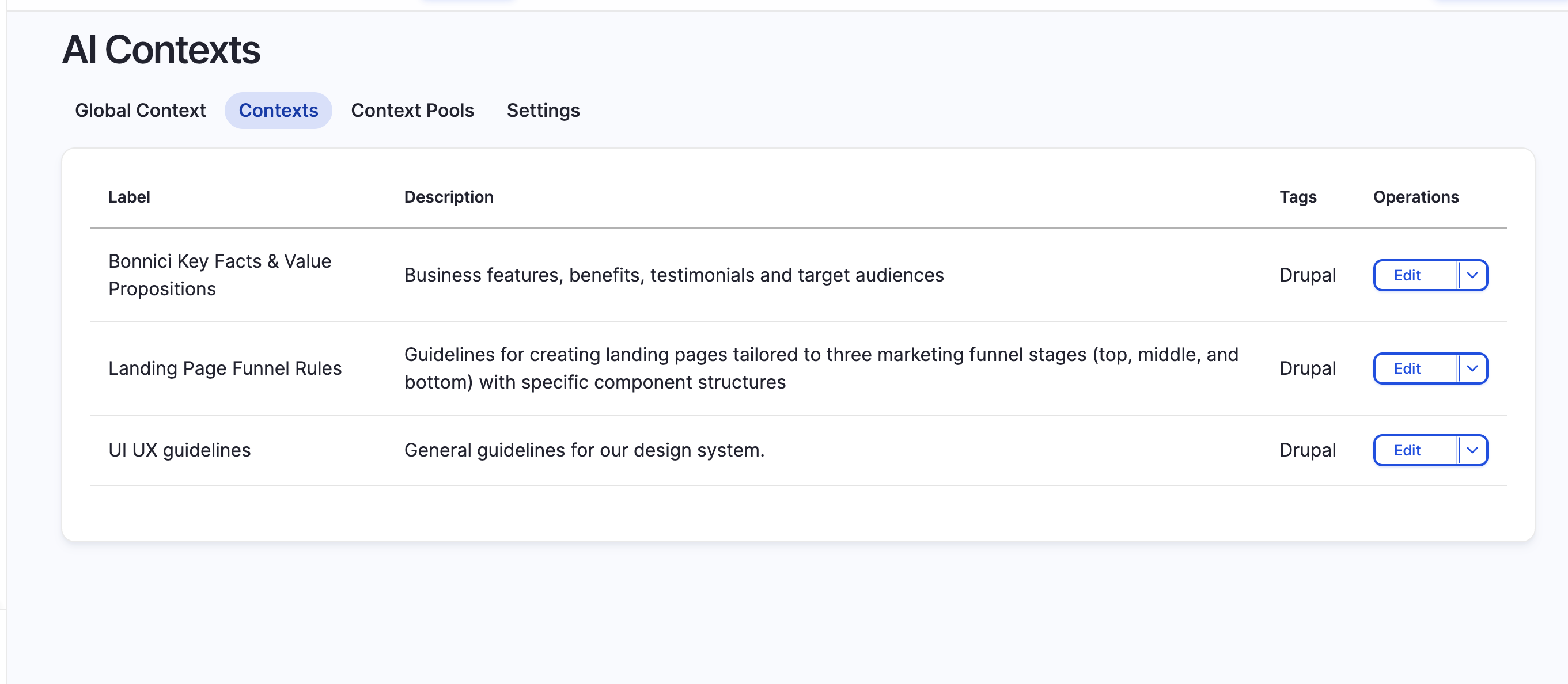
What Context Entities Look Like
For my agency site, I configured several context entities. Here's a stripped-back example of what they contain:
Bonnici Key Facts & Value Propositions:
## Business Overview

### Key Facts
- New Zealand-based Drupal development agency
- Enterprise experience across government, healthcare, education
- Open source commitment - we contribute back to Drupal
- Boutique agency with senior-only team

### Value Propositions
- Trusted expertise: 15+ years of Drupal development
- Enterprise-grade: We've built systems that serve millions
- Long-term partnership: Ongoing support, not just project delivery
- Transparent process: You see what we build, how we build it

### Testimonials & Social Proof
- Include client quotes where relevant
- Reference recognisable organisations when appropriate
- Let results speak - specific metrics over vague claims
Landing Page Funnel Rules:
## Marketing Funnel Guidelines

### Top of Funnel (Awareness)
- Purpose: Attract and educate
- Components: Hero with broad value proposition, educational content sections
- Tone: Informative, problem-focused
- CTAs: Soft engagement (read more, subscribe, download guide)

### Middle of Funnel (Consideration)
- Purpose: Build trust and demonstrate expertise
- Components: Case studies, service details, comparison sections
- Tone: Authoritative, solution-focused
- CTAs: Medium commitment (book a call, request a demo)

### Bottom of Funnel (Decision)
- Purpose: Convert to action
- Components: Pricing, specific offers, urgency elements
- Tone: Direct, confident, reassuring
- CTAs: High commitment (get started, contact us, request quote)
UI UX Guidelines:
## Design System Rules

### Component Preferences
- Hero sections: Use 'hero' SDC with highlight text feature
- Content sections: Use 'flexible-section' with slots for composition
- CTAs: Dark background (#2e2d2d), white text, 12px border radius

### Colour Palette
- Primary: #2e2d2d (near-black)
- Accent: #6b94ec (blue for highlights)
- Background: #f9f7f6 (warm off-white)
- Text: #2e2d2d on light, #ffffff on dark

### Typography
- Headings: IBM Plex Sans, 700 weight
- Body: System font stack
- Hero titles: 74px desktop, 48px mobile

### Spacing
- Section padding: 100px vertical desktop, 40px mobile
- Container max-width: 1200px
- Component gap: 80px
For decision makers: Context entities are your brand guidelines made machine-readable. Define them once, choose where they apply, and every AI interaction reflects that knowledge automatically. Update your guidelines in one place and the AI immediately reflects those changes across all outputs.
For technical readers: Context entities support taxonomy tags for selective injection - you can have different contexts for B2B vs B2C content, or different design rules for marketing pages vs documentation. The AI Agents module handles the filtering logic based on tags you configure.
With Canvas as the builder and AI Context as the brain, we need one more piece: an agent that brings them together.
Pillar Three: Canvas AI
Canvas AI is the orchestration layer - the canvas_ai submodule that was the flagship feature at DrupalCon Vienna 2025. It's an AI agent that understands three things simultaneously:
- Available components from your Canvas library
- Brand context from your AI Context entities
- User intent from your prompt
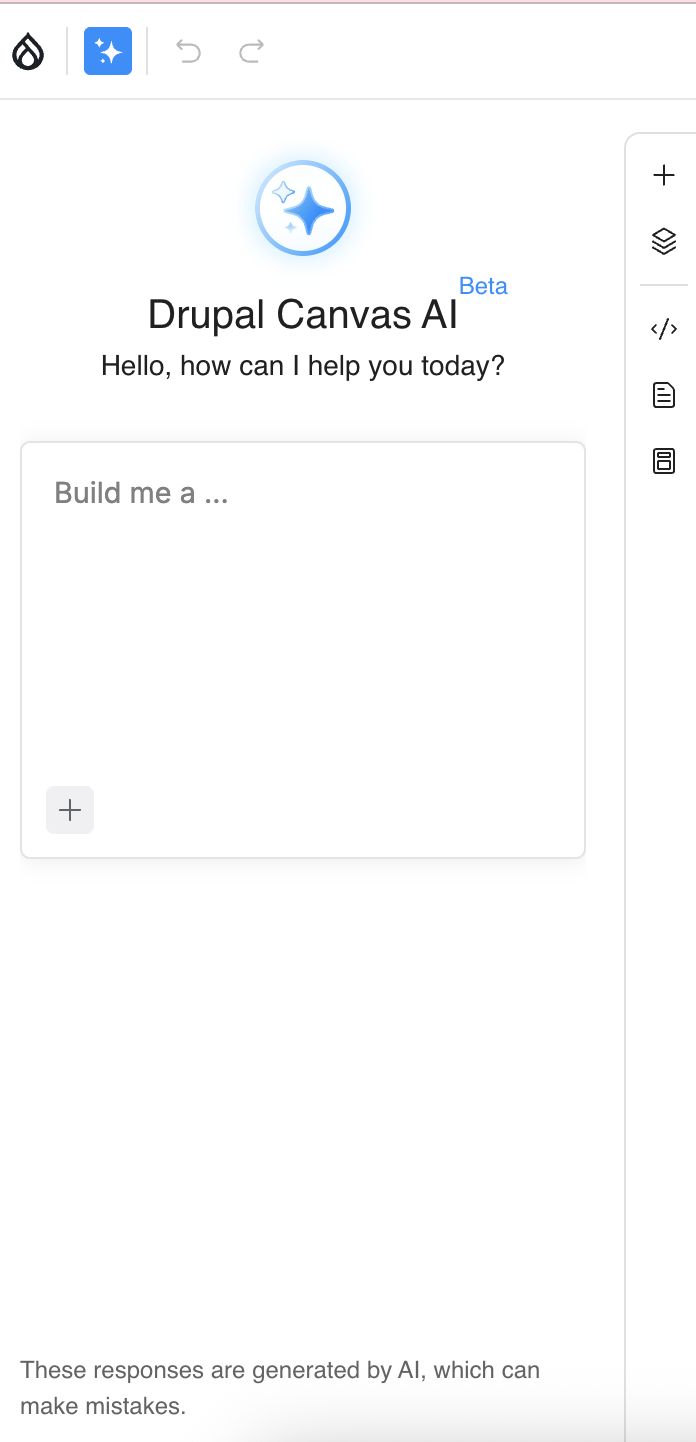
How It Works
When you submit a prompt to Canvas AI, here's what happens:
- You provide a prompt describing the page you want
- Canvas AI receives your prompt PLUS all relevant context from AI Context
- The agent examines available components from your Canvas library
- It configures component props based on your design system and brand voice
- A complete page is generated in Canvas for your review
The agent isn't writing HTML or making things up. It's selecting from your approved components and configuring them according to your defined standards. The output is constrained by your design system, not the AI's imagination.
┌─────────────────────────────────────────────────────────┐
│                      USER PROMPT                         │
│         "Build a homepage for my Drupal agency"         │
└─────────────────────┬───────────────────────────────────┘
                      │
                      ▼
┌─────────────────────────────────────────────────────────┐
│                    CANVAS AI AGENT                       │
│                                                         │
│  ┌─────────────┐    ┌─────────────┐    ┌─────────────┐ │
│  │   Canvas    │    │  AI Context │    │    LLM      │ │
│  │ Components  │    │  Entities   │    │  (Claude)   │ │
│  │             │    │             │    │             │ │
│  │ - Hero      │    │ - Brand     │    │ - Reasoning │ │
│  │ - Section   │    │ - Audience  │    │ - Generation│ │
│  │ - Cards     │    │ - Design    │    │             │ │
│  │ - CTA       │    │ - Content   │    │             │ │
│  └─────────────┘    └─────────────┘    └─────────────┘ │
│                                                         │
└─────────────────────┬───────────────────────────────────┘
                      │
                      ▼
┌─────────────────────────────────────────────────────────┐
│                  GENERATED PAGE                          │
│     Components configured with correct props/content    │
└─────────────────────────────────────────────────────────┘
This is not a chatbot writing copy. It's an intelligent agent that understands your design system, brand voice, and component library - then builds pages that actually match your standards.
For decision makers: Canvas AI means your marketing team can generate on-brand landing pages in minutes, not days. The output is constrained to your approved components and design system, so brand consistency is automatic.
For technical readers: Canvas AI uses the AI Agents module architecture. Context injection happens via the AI Context integration. The agent has access to component schemas (JSON Schema props from your SDCs) and uses them to configure components correctly.
The Workflow: Building My Homepage
Let's see this in action. Here's how I rebuilt my agency homepage using the full stack.
The Setup
- AI Context entities configured (brand voice, target audience, design system)
- Canvas components available (hero, flexible-section, cards, CTA buttons)
- Canvas AI enabled with Claude Sonnet 4.5 as the provider
The Single Prompt
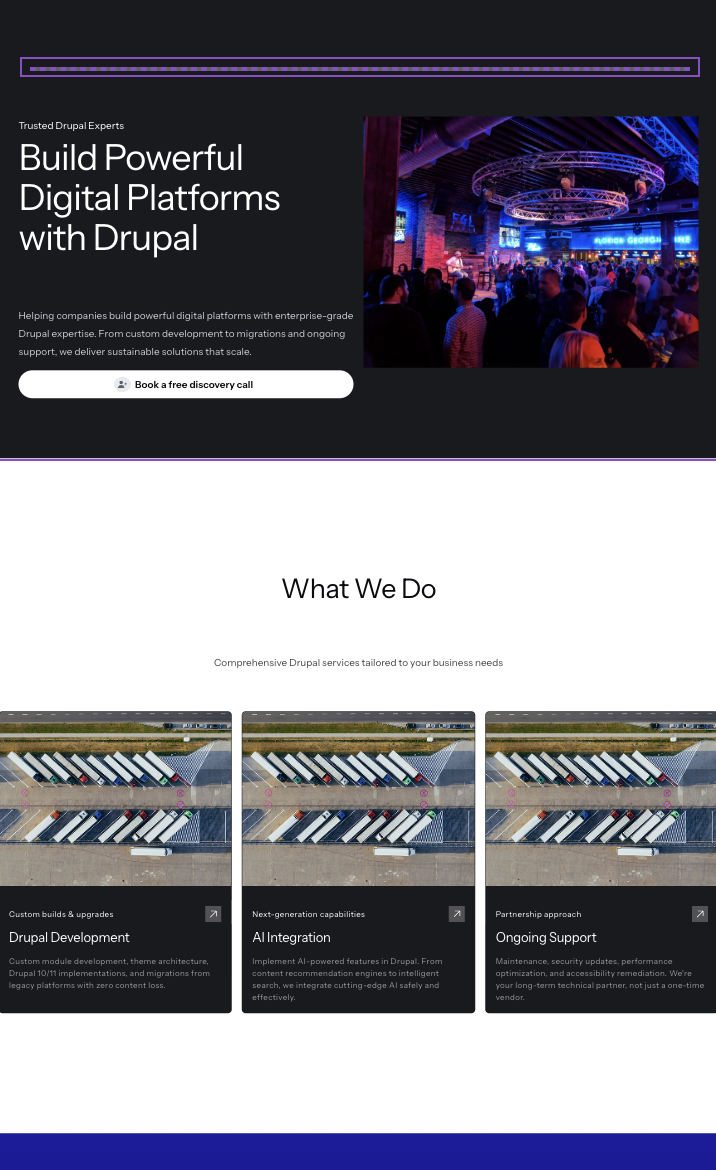
With comprehensive context in place, a single well-crafted prompt generates an entire homepage. This is the payoff of good context engineering - you don't need to specify colours, tone, or component choices. The context handles it.
Here's the actual prompt I used:
Build a homepage for my Drupal development agency with the following sections:

## Hero Section
- Main headline emphasizing trusted Drupal expertise
- Highlight the word "Drupal" in the accent colour
- Subheadline about helping companies build powerful digital platforms
- CTA button: "Book a free discovery call" linking to /contact

## Services Overview
- Section heading: "What We Do"
- Three service cards:
  1. Drupal Development - Custom builds, migrations, upgrades
  2. AI Integration - Implementing AI capabilities in Drupal
  3. Ongoing Support - Maintenance, security, performance

## Why Choose Us
- Section with warm background
- Key differentiators: NZ-based, enterprise experience, open source commitment
- Include brief proof points

## Recent Work
- Showcase 2-3 project highlights
- Use card components with project name, brief description, and industry

## Call to Action
- Final CTA section encouraging contact
- Reinforce the "trusted experts" positioning
Notice what's NOT in that prompt: colours, fonts, component names, tone guidance, audience considerations. All of that comes from the context entities. The prompt focuses purely on what I want, not how it should look or sound.
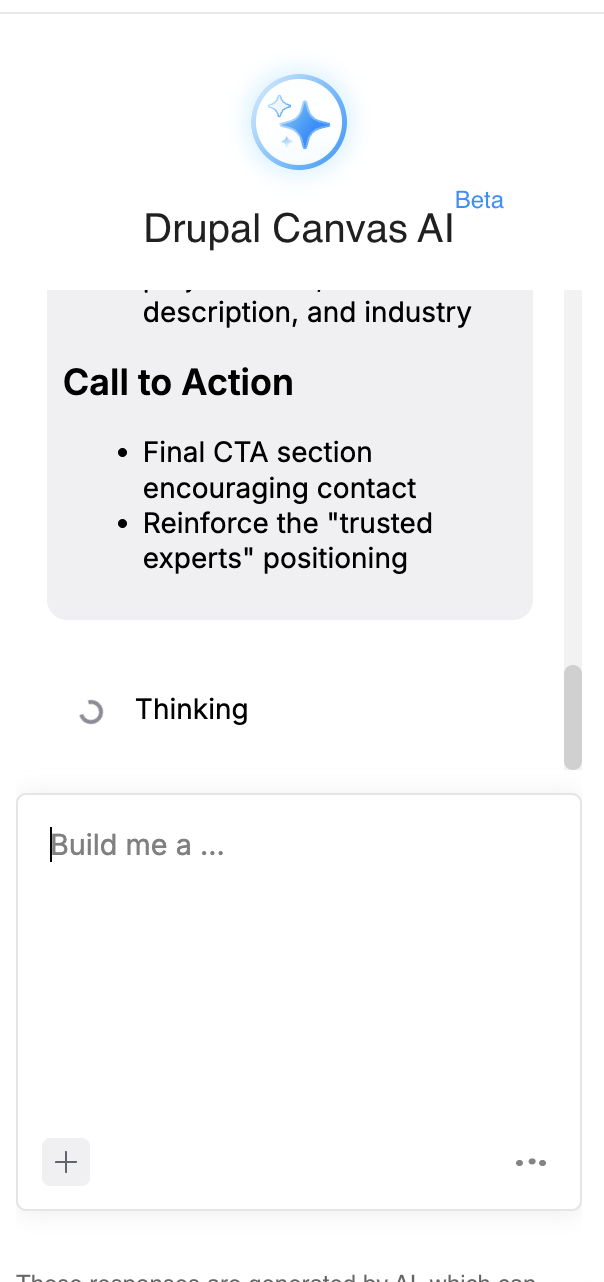
The Result
Canvas AI generated a complete homepage using:
- Hero component with "Drupal" highlighted in #6b94ec (from design system context)
- Flexible-section components with #f9f7f6 background (from design system context)
- Card components for services and projects
- CTA buttons with #2e2d2d background and 12px border radius (from design system context)
- Copy written in a professional but conversational tone (from brand voice context)
- Messaging targeted at enterprise decision makers (from audience context)
What the AI Actually Sees
For technical readers who want to understand the mechanics: all context entities get compiled into a single context block that's injected with your prompt. Here's a simplified version of what Canvas AI actually receives:
# Site Context

## Brand Identity
You are creating content for Bonnici, a Drupal development agency based in New Zealand.

### Voice
- Professional but conversational
- Confident without arrogance
- Direct and practical
- New Zealand-grounded, authentic

### Language Rules
- Use "we" for company, "you" for reader
- Avoid jargon and buzzwords
- Prefer plain language and concrete examples

## Target Audiences

### Primary: Enterprise Decision Makers
- CTOs, Digital Directors, IT Managers
- Evaluating CMS platforms or Drupal partners
- Care about: risk reduction, ROI, long-term support

### Secondary: Technical Leads
- Senior developers and architects
- Care about: code quality, modern practices

## Design System

### Available Components
- hero: Hero section with title, highlight, description, CTA
- flexible-section: Container with heading and content slot
- card: Content card with title, description, optional image
- cta-button: Call to action button with text and URL

### Colour Palette
- Primary: #2e2d2d (near-black)
- Accent: #6b94ec (blue)
- Background: #f9f7f6 (warm off-white)

### Typography
- Headings: IBM Plex Sans, 700 weight
- Hero titles: 74px desktop, 48px mobile

## Content Guidelines
- Lead with problems, then solutions
- End sections with clear CTAs
- Link to related content

---

# User Request

Build a homepage for my Drupal development agency...
[Full prompt continues here]
This is context engineering in practice. The structure, specificity, and organisation of this context directly impacts output quality. Garbage context produces garbage pages. Well-structured context produces pages that match your brand on the first try.
For decision makers: This context block is automatically assembled from your AI Context entities. No one manually writes this for each request - it's injected dynamically based on tags and rules you configure once.
The Cost Breakdown
Let's talk money. AI-assisted page building sounds expensive until you see the actual numbers.
The Models
| Model | Input (per 1M tokens) | Output (per 1M tokens) | Best For |
|---|---|---|---|
| Claude Sonnet 4.5 | $3.00 | $15.00 | Complex page generation, highest quality |
| Claude Haiku 4.5 | $1.00 | $5.00 | Good quality, budget-conscious |
| Claude Haiku 3 | $0.25 | $1.25 | High volume, simple tasks |
Estimated Token Usage for Homepage Build
| Component | Input Tokens | Output Tokens | Notes |
|---|---|---|---|
| Context injection | ~2,000 | - | Brand, audience, design system |
| User prompt | ~500 | - | The page request |
| Component schemas | ~1,500 | - | Available SDC definitions |
| Generated page | - | ~3,000 | Component configs + content |
| Total | ~4,000 | ~3,000 | Single comprehensive prompt |
Cost Per Homepage Build
| Model | Input Cost | Output Cost | Total |
|---|---|---|---|
| Sonnet 4.5 | $0.012 | $0.045 | ~$0.06 |
| Haiku 4.5 | $0.004 | $0.015 | ~$0.02 |
| Haiku 3 | $0.001 | $0.004 | ~$0.005 |
Building a homepage with Canvas AI costs approximately:
- 6 cents with Sonnet 4.5 (Great quality)
- 2 cents with Haiku 4.5 (good balance of quality and cost)
- Half a cent with Haiku 3 (basic tasks)
I didn't test with Opus but I'm sure it would perform even better, albeit slower and more expensive. Even at the highest quality tier, you could generate 1,600 homepage variations for $100.
For decision makers: The cost of AI-assisted page building is negligible compared to developer time. Even Sonnet 4.5 costs less than a minute of developer salary. The ROI question gets flipped on its head - testing variations becomes trivial, so the barrier shifts to having good ideas rather than execution time.
For technical readers, these estimates assume ~4K input tokens (context + prompt + schemas) and ~3K output tokens (generated page). Actual usage varies by page complexity and context size. Prompt caching can reduce costs further - cache reads are 0.1x base price. If you're generating many pages with the same context, caching makes this even cheaper.
Model Selection Guidance
- Use Sonnet 4.5 for: Client-facing pages, complex layouts, when quality matters most
- Use Haiku 4.5 for: Internal pages, iterative drafts, high-volume generation
- Use Haiku 3 for: Simple content updates, bulk operations, development/testing
I used Sonnet 4.5 for my homepage because it's the flagship page of my agency site. For internal pages or rapid iteration, Haiku 4.5 hits the sweet spot.
What This Means for Drupal's Future
Canvas, AI Context, and Canvas AI represent genuine innovation. They make it fast and enjoyable to build on-brand pages for marketing new products or testing new services. Combined with other AI-ready modules, Drupal is positioning itself as a frontrunner in the CMS space - especially among open source options.
The shift:
- From "page builder" to "AI-native page builder"
- From "brand guidelines document" to "machine-readable brand intelligence"
- From "write content" to "describe intent, review output"
For Decision Makers
Early adopters aren't taking reckless risks here. The Drupal AI module hit stable 1.2.0 in October 2025. Canvas 1.0 released November 2025. These are production-ready tools from the community that built enterprise Drupal.
Implementing this stack now positions your organisation to:
- Accelerate content production without expanding teams
- Maintain brand consistency automatically
- Iterate on pages in seconds instead of hours
- Build institutional knowledge that compounds over time
The context you define today becomes more valuable as AI capabilities expand. Your brand voice entity doesn't just help Canvas AI - it helps AI CKEditor, AI automators, and whatever comes next.
For Technical Readers
The architecture is sound. SDCs with JSON Schema provide type-safe component interfaces. AI Context provides structured, filterable context injection. The AI Agents module provides the orchestration layer.
This is where Drupal is heading. Canvas becomes the default page builder in Drupal CMS 2.0 (January 2026). The AI module ecosystem is maturing rapidly, and organisations that invest in context engineering now - defining their brand, audience, and design system as machine-readable entities - will compound that investment as AI capabilities expand.
Getting Started
Here's the path to implementing this stack:
- Install the stack: Canvas, AI module, AI Context module
- Configure an AI provider: Claude (Anthropic) or OpenAI - I recommend starting with Haiku 4.5 for cost-effective experimentation
- Define your first context entities: Start with brand voice and design system
- Build a test page: Try a simple landing page to learn the workflow
- Iterate on context: Refine your entities based on output quality
The FreelyGive demo repository provides a complete example setup if you want to see how it all fits together.
Resources
- Canvas Project Page
- Canvas Documentation
- Canvas AI Assistant Docs
- AI Module
- AI Context Module
- Claude API Pricing
For more on Canvas specifically, see my previous posts:
For AI in Drupal more broadly:
Get the newsletter
Drupal insights and client stories, delivered fortnightly. No spam, unsubscribe anytime.