3 Drupal Recipes You Might Not Know About (But Definitely Should)

Drupal recipes landed in core with Drupal 10.3 in June 2024, and they change how we extend sites. Instead of manually installing modules, configuring settings, and clicking through admin screens for an hour, you run a single command and walk away with a fully configured feature.
Most people know about the official Drupal CMS recipes that ship with the platform. Those are solid, giving you blog functionality, event management, and basic site features out of the box. But the interesting stuff is happening in the community recipe ecosystem, where developers are packaging up solutions to specific problems that took hours to build manually.
Since this is so fresh, the really useful ones have almost no installs yet because most people don't know they exist. I've been tracking the recipe ecosystem intermittently since it launched, and I keep finding gems buried in Packagist with single-digit install counts that solve problems I've seen clients pay thousands to implement.
Today I want to show you three recipes that represent different use cases - payments, AI-powered content management, and visual automation. They take tedious Drupal configurations and collapse them into a composer require and a drush recipe command.
If you've been following my writing on AI quick wins for Drupal or MCP server integration, you already know I'm invested in the direction of the platform and these are bullish signals.
What Makes Drupal Recipes Different
Before we dive into specific recipes, here's a quick overview of recipes.
Traditional Drupal distributions bundle everything together—modules, themes, configuration—into one big package. Once you install a distribution, you're married to it. You can't easily pick and choose pieces, and updating becomes complicated because you're fighting against the distribution's opinions about how things should work.
Recipes flip this. According to the official Drupal documentation, "Recipes automate module installation and configuration. They can install modules and themes and set up configuration on an existing Drupal installation."
The main difference is that recipes are applied once and then disappear. They're not a dependency you maintain. They run, configure your site, and you're free to customize everything afterwards. As the ImageX Media team explained, "Once applied, you are no longer dependent on the Recipe package and it can be safely removed from your project keeping all the configured setup intact."
This means:
- No ongoing package maintenance for configuration tools
- Complete customisation freedom after application
- The ability to stack multiple recipes without conflicts
- Clean projects without configuration cruft
With that foundation, let's look at three recipes that demonstrate what's possible when you package expertise into composable automation.
Recipe #1: Stripe Webform Donation — Payments in Minutes
Package: drupal/stripe_webform_donation
Installs: 6
Use Case: Non-profits, churches, community organisations, fundraising campaigns
Here's a scenario that plays out constantly: a non-profit organisation needs to accept online donations. They have a Drupal site already. What should be a straightforward requirement turns into a multi-day project involving Webform configuration, Stripe module setup, payment gateway credentials, form builder customisation, and anti-spam measures. I remember doing one of these with PayPal about 8 years ago and it took a good week or two sifting through API endpoints and all the rest.
Now you install this recipe and it's done in about three minutes.
What It Actually Does
The Stripe Donation Form recipe bundles together:
- Webform module with a pre-configured donation form
- Stripe payment integration with a credit card element
- Anti-spam protection to prevent bot submissions
- Proper field validation for donor information
- Email confirmations for successful donations
During installation, the recipe prompts for your Stripe API keys. You can apply it without keys (useful for dev environments), but the credit card element won't actually function until you provide valid credentials.
How to Use It (assuming ddev)
# Install the recipe package
ddev composer require drupal/stripe_webform_donation:^1

# Apply the recipe
ddev drush recipe ../recipes/stripe_webform_donation
That's it. The recipe runs, installs dependencies, creates the form, and configures the payment gateway.
After installation:
- Configure live API keys at
/admin/config/system/stripe - View the donation form at
/form/donation - Customise form fields at
/admin/structure/webform/manage/donation
Canvas Compatibility Note:
If you're running Drupal Canvas for AI-native page building, there's currently a known compatibility issue between Webform and Canvas that affects this recipe. I have created a merge request in progress to resolve the conflict. For now, if you're using Canvas, you may need to wait for the fix or apply the patch manually from the issue queue.
 A complete donation form with Stripe payment processing, configured in minutes
Why This Matters
This recipe demonstrates the real value proposition of the recipe ecosystem: packaging domain expertise into reusable automation.
Someone (in this case, Pamela Baron - one of the leads of Canvas) already figured out the right modules, the correct configuration, the proper security setup, and the expected workflow for donation forms. That knowledge is now distributed as executable code that runs in production environments.
The recipe was created in July 2025 and hit stable 1.0.0 in February 2026. It's security-covered under the Drupal Security Advisory Policy, which means it's treated like a real project, not a proof of concept.
This is exactly the kind of solution that traditionally lived in agency internal libraries or got rebuilt from scratch for every client. Now it's a community resource.
Recipe #2: AI Image Classification — Smarter Media Management
Package: drupal/ai_recipe_image_classification
Installs: 73
Use Case: Content teams with large media libraries, sites building toward AI-powered search
If you've worked with Drupal media libraries at any scale, you know the problem - hundreds or thousands of images with minimal metadata. Content editors upload photos, maybe add a filename-based title, and that's it. Six months later, nobody can find anything because there's no meaningful description, categorisation, or tagging.
Manual metadata entry doesn't scale. Editors won't do it consistently, and going back to tag existing images is a project that never gets prioritised.
This is where AI becomes a huge win rather than just a cutesy add-on.
What It Actually Does
The AI Image Classification recipe integrates with the Drupal AI module to automatically analyse and describe images in your media library. It's built by the team at 1xINTERNET, which has been heavily involved in the AI module development.
When content editors upload an image, the AI:
- Generates a descriptive alt text for accessibility
- Creates searchable tags based on image content
- Adds a detailed description for media metadata
- Enables semantic search capabilities
This isn't just about current convenience. It's laying the groundwork for retrieval-augmented generation (RAG) and semantic search—the same patterns I covered in my guide to semantic search with Milvus.
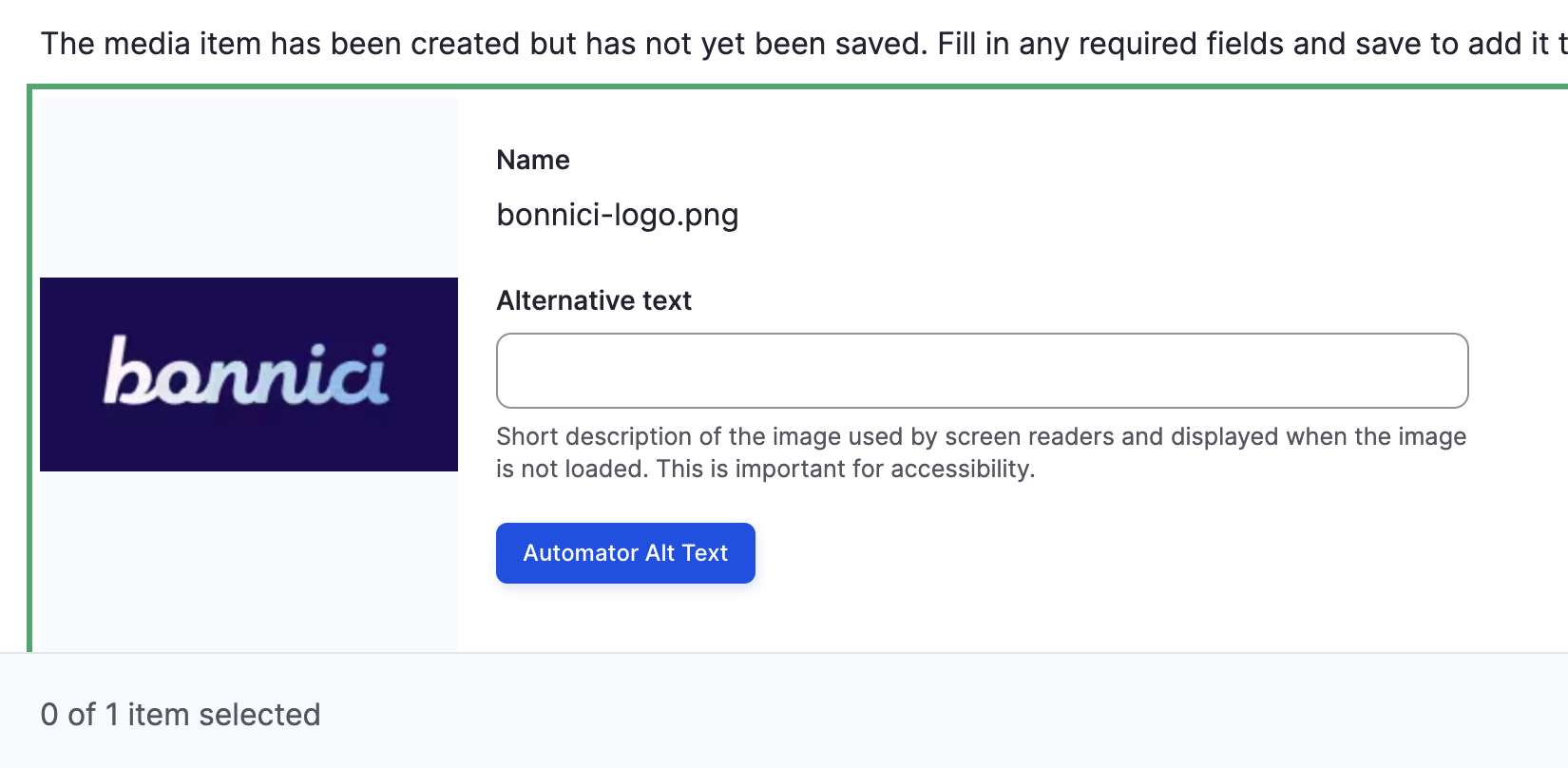 AI-powered image analysis makes your media library searchable and accessible
How to Use It
Step 1: Install the AI Module Ecosystem
Before applying the recipe, you need the Drupal AI module with vision and chat capabilities:
# Install AI module with required sub-modules
composer require drupal/ai

# Enable AI core, vision, chat, and token support
drush en ai token -y
Step 2: Configure Your AI Provider
Navigate to /admin/config/ai/providers and set up your AI provider. You'll need to choose between:
- OpenAI - Requires API key from OpenAI (supports GPT-4 Vision)
- Anthropic - Requires API key from Anthropic (supports Claude with vision)
- Local/Self-hosted - For organisations with data residency requirements (Ollama, LM Studio, etc.)
Setting Up OpenAI (Recommended for Image Classification):
If you're using OpenAI for vision capabilities:
-
Get an API Key: Visit platform.openai.com/api-keys and create a new API key
-
Install the OpenAI Provider Module (this should come packaged):
composer require drupal/ai_provider_openai drush en ai_provider_openai -y -
Configure the Provider:
- Navigate to
/admin/config/ai/providers/add - Select "OpenAI" as the provider type
- Enter your API key (or use the Key module for secure storage)
- For vision tasks, select the GPT-4o or GPT-4 Turbo model (both support vision)
- Set a reasonable rate limit (e.g., 50 requests per minute for OpenAI's standard tier)
- Navigate to
-
Secure Storage (Recommended): Store your API key using the Key module at
/admin/config/system/keysrather than hardcoding it in configuration. This keeps credentials out of version control.
Or Just Use the Drupal CMS Recipe:
The recipe itself doesn't require you to have AI configured before applying it—you can install the recipe first and configure the AI provider afterward. This is useful if you want to set up the structure in development environments without immediately connecting to paid AI services. The image classification automation simply won't run until you add valid API credentials.
Step 3: Apply the Recipe
# Install the recipe
composer require drupal/ai_recipe_image_classification:^1

# Apply the recipe
drush recipe ../recipes/ai_recipe_image_classification
Required Patch:
For the AI image classification to work properly with the media library, you'll need to apply this patch to the AI module:
# Apply the field widget action patch for media library
curl -O https://www.drupal.org/files/issues/2026-03-06/3574811-field-widget-action-media-library-1.2.x.patch
patch -p1 < 3574811-field-widget-action-media-library-1.2.x.patch
Alternatively, add this to your composer.json patches section:
"drupal/ai": {
  "Field widget action for media library": "https://www.drupal.org/files/issues/2026-03-06/3574811-field-widget-action-media-library-1.2.x.patch"
}
What You Need to Configure:
- AI Provider Credentials - API keys for your chosen service (OpenAI, Anthropic, etc.)
- Vision Model Selection - Which vision model to use (GPT-4o, Claude 3.5 Sonnet, etc.)
- Media Type Settings - Which media types should get automatic classification
- Field Mapping - Where AI-generated descriptions and tags should be stored
Once configured, image classification happens automatically when media is uploaded or can be run as a batch process on existing images using the AI module's batch processing tools.
Why This Fits Your AI Strategy
I've written before about AI quick wins for Drupal that deliver immediate value without architectural risk. Automated image classification is exactly that kind of win.
It solves a real problem (poor media metadata) with proven technology (vision AI models) in a way that integrates cleanly with existing workflows (the media library editors already use). There's no new interface to learn, no separate system to maintain, no vendor lock-in beyond your choice of AI provider.
This recipe positions your content for future AI capabilities. When your organisation decides to implement conversational search or AI-assisted content discovery, you'll have a media library that's already semantically indexed and ready to support those features.
This is strategic AI adoption — think about how excited a board would be to hear that string of buzz words.
Recipe #3: ECA Starterkit — Visual Workflow Automation
Package: drupal/eca_starterkit
Installs: 0 (Very fresh)
Use Case: Site builders who need automation without custom code, teams implementing business logic visually
Updated just days ago (March 2026). Solves a problem that typically requires either expensive developer time or settling for limited capabilities.
ECA—Event, Condition, Action—is Drupal's answer to no-code automation platforms like Zapier or n8n, but it's built directly into your Drupal site. According to the official ECA project page, it's "the no-code solution that empowers you to orchestrate your Drupal site" with over 15,857 sites already using it.
The problem with ECA historically was the initial setup—installing the right modules, configuring the visual modeller, understanding which sub-modules you need for different capabilities. It's not hard, but it's enough friction that people skip it.
The ECA Starterkit recipe removes that friction.
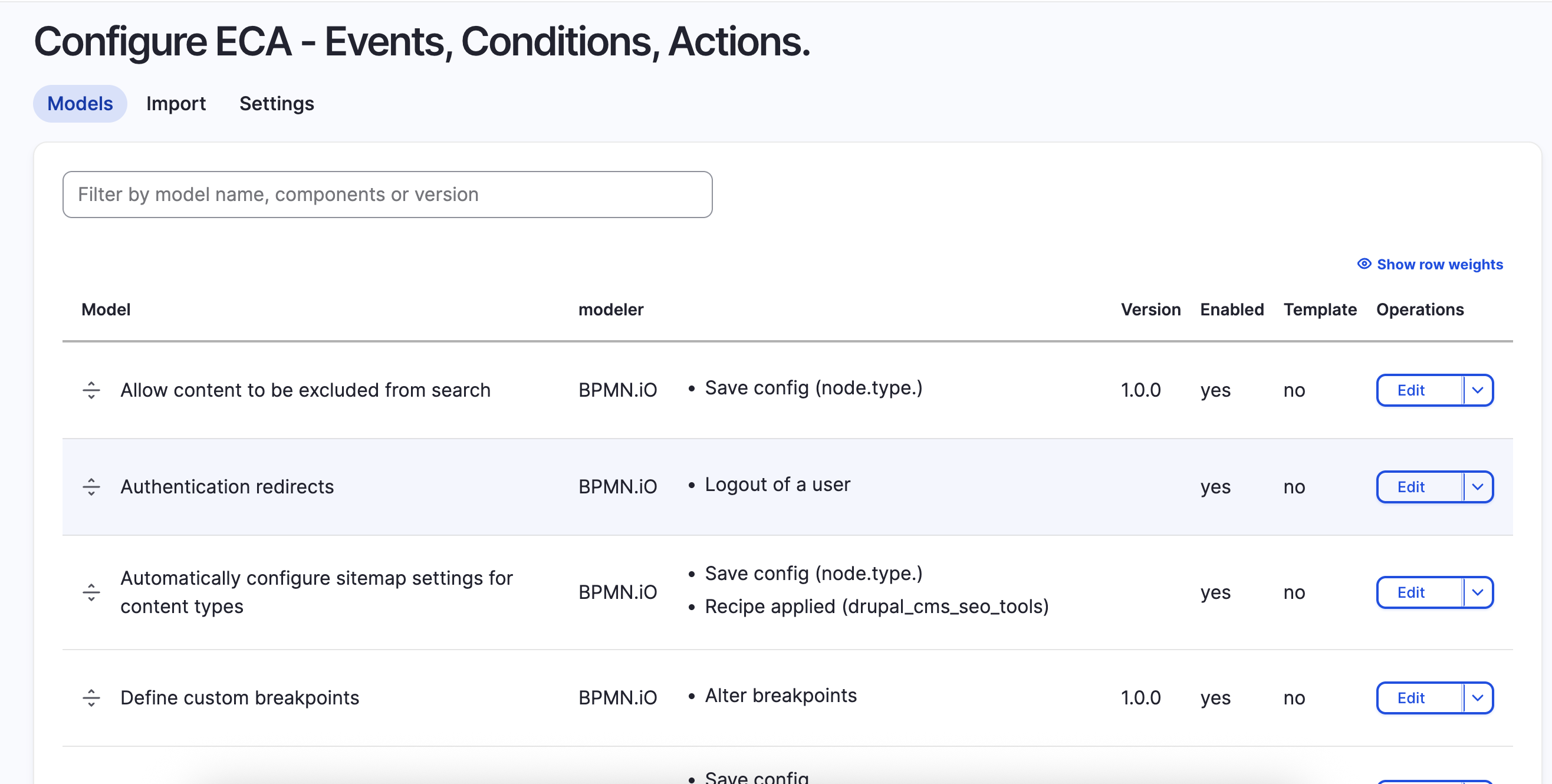 ECA provides a complete visual automation environment with 25+ sub-modules for content operations, forms, media, and integrations
What It Actually Does
The ECA Starterkit gives you a complete ECA environment with:
- ECA core module (version 3.1+)
- ECA Tamper for data transformation
- BPMN Modeller for visual workflow design
- Modeller API for programmatic access
This is a curated set of the recommended ECA components, saving you from reading documentation to figure out which modules you need for visual automation.
How to Use It
# Install the recipe
composer require drupal/eca_starterkit:^1

# Apply the recipe
drush recipe ../recipes/eca_starterkit
What Actually Gets Installed:
Because the ECA starterkit includes alpha and dev versions, Composer may need to temporarily adjust your minimum-stability setting. Here's what the installation brings in:
drupal/eca_starterkit(1.0.x-dev)drupal/eca(3.1.0-alpha4, upgraded from 3.0.10)drupal/eca_tamper(2.0.9)drupal/modeler(1.0.0-alpha6)drupal/modeler_api(1.1.0-alpha6, upgraded from 1.0.6)drupal/tamper(1.0.0-beta2)
The alpha/beta versions here aren't a concern—ECA is actively maintained with over 15,857 sites using it in production. The starterkit packages bleeding-edge versions because the ECA ecosystem moves fast, and these pre-release versions contain features the visual modeller needs.
After installation, you get access to the visual modeller at /admin/config/workflow/eca.
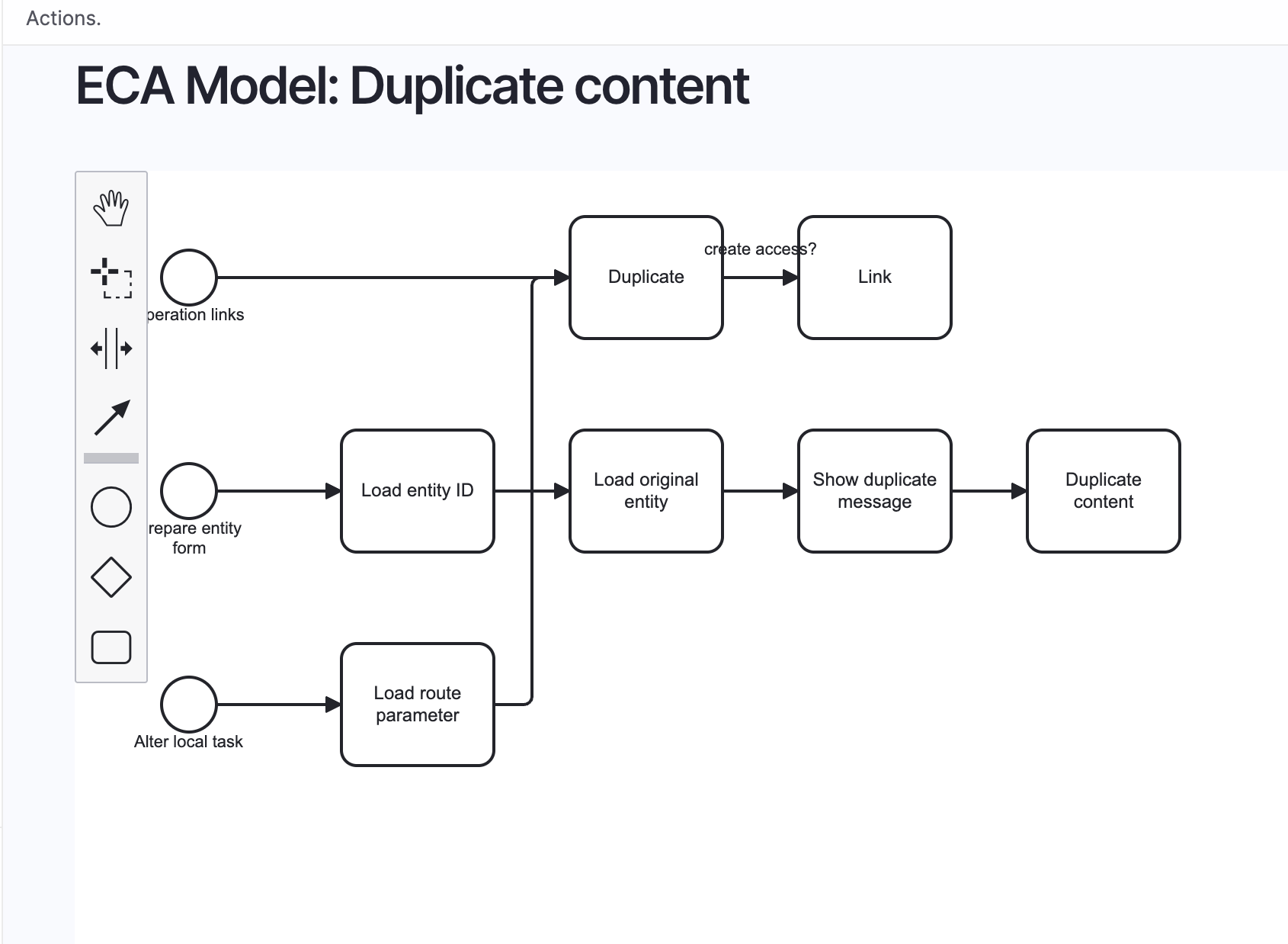 The BPMN modeller lets you design complex workflows visually—no code required. Build event-driven automations by connecting events, conditions, and actions with a drag-and-drop interface.
What You Can Build With ECA
From the visual modeller, you can create automations across your entire Drupal site:
Content Publishing Workflows
- Automatically feature content based on tags or taxonomy
- Send notifications when content reaches certain states
- Sync published content to external systems or social media queues
- Enforce approval workflows for specific content types
User & Access Management
- Auto-assign roles based on email domains or registration data
- Send customised welcome emails with user-specific resources
- Notify admins when users with specific criteria register
- Automatically moderate or block suspicious user accounts
Data Processing & Cleanup
- Schedule nightly content audits for outdated or unused nodes
- Automatically archive or unpublish content based on analytics
- Transform and normalise data on form submissions
- Batch process media files for optimisation or tagging
Integration & API Automation
- Trigger webhooks when content changes occur
- Sync form submissions to CRM or email marketing platforms
- Pull data from external APIs on schedule or events
- Build complex conditional logic for third-party service integrations
These are just starting points—ECA's 25+ sub-modules cover everything from commerce workflows to cache invalidation to PDF generation. The visual modeller makes it possible to build and test these automations without writing custom code, then export them as recipes for deployment across multiple sites.
Why ECA Is Underappreciated
The Kanopi Studios guide describes ECA as "massively underappreciated" and I completely agree. It provides Zapier-level automation without leaving Drupal, without monthly SaaS fees, and without sending your data to third-party services.
ECA supports 25+ sub-modules covering everything from content operations to form handling, caching, media processing, and third-party integrations. The visual BPMN modeller means site builders can implement business logic without bothering developers for every small workflow change.
ECA 2 even allows exporting any workflow as a Drupal recipe. That means organisations can create custom automation workflows, test them in dev, and package them as recipes that deploy consistently across multiple sites.
If you're managing multiple Drupal properties or maintaining client sites, this capability alone is worth exploring.
How Recipes Fit Into Modern Drupal Development
What we're seeing with recipes is a shift in how Drupal functionality gets distributed and implemented. Instead of just modules that provide raw capabilities, we're getting packages of configured, opinionated solutions.
This mirrors what happened with the LocalGov Drupal initiative and the broader Drupal CMS project. These initiatives recognised that organisations don't want to assemble functionality from scratch—they want solutions that reflect best practices and community knowledge.
Recipes take this further by being:
Composable: Stack multiple recipes without conflicts Disposable: No long-term dependency on recipe packages Portable: Export your own configurations as recipes for reuse Community-driven: Anyone can publish recipes for others to use
The Drupal Recipes Cookbook is growing rapidly. Looking at the recipe browser on Drupal.org, you'll find recipes for events, alerts, landing pages, person content types, and dozens of other common patterns.
What started as a strategic initiative in 2024 is becoming a fundamental part of how Drupal sites are built in 2026.
Getting Started With Recipes
If you're running Drupal 11.2 or later (including Drupal CMS 1.2.0+), recipe support is already configured. You can start using recipes immediately.
For older Drupal versions, you'll need to configure Composer first:
# Allow the recipe unpack plugin
composer config allow-plugins.drupal/core-recipe-unpack true

# Require the unpack plugin
composer require drupal/core-recipe-unpack

# Update Composer installers
composer require composer/installers:^2.3

# Configure recipe installation path
composer config --merge --json extra.installer-paths \
  '{"recipes/{$name}":["type:drupal-recipe"]}'
After that initial setup, using any recipe follows the same pattern:
composer require drupal/[recipe-name]
drush recipe ../recipes/[recipe-name]
Use the verbose flag (drush recipe recipes/[recipe-name] -v) to see detailed output about what the recipe is installing and configuring. This is especially useful when you're learning how recipes work or troubleshooting issues.
The Bigger Picture: AI, Automation, and Content Infrastructure
These three recipes—Stripe payments, AI image classification, and ECA automation—represent different facets of modern Drupal development, but they share a common thread: they're all about making sophisticated capabilities accessible without extensive custom development.
This connects directly to the content infrastructure work I've been writing about. Organisations are realising that their CMS needs to be more than just a publishing tool—it needs to be AI-ready, automation-capable infrastructure that can evolve with their needs.
The AI image classification recipe prepares your media library for semantic search and RAG implementations. The ECA starterkit gives you the workflow automation that enterprise organisations typically build custom or buy as separate SaaS. The Stripe donation recipe demonstrates how community recipes can package complete feature sets that used to require agency consulting engagements.
If you've been exploring Claude Code for Drupal development or setting up MCP servers, you're already thinking about how AI tools interact with your content infrastructure. Recipes are part of that same evolution—making sophisticated capabilities accessible through standardized, community-supported patterns.
Final Thoughts
The recipe ecosystem is still young with Drupal 10.3 only launching in June 2024 - but it's already showing its potential. We're seeing recipes with single-digit installs that solve real problems organisations are actively paying to build.
The three recipes I've covered today represent just a fraction of what's available and what's being built. The Distributions and Recipes initiative is actively developing new patterns, and community contributions continue to expand the ecosystem.
If you're building on Drupal in 2026, recipes should be part of your toolkit. They represent the community codifying best practices into executable packages—knowledge that used to live in agency heads or require consulting engagements, now available as composer require commands.
Sources
- Drupal Recipes Official Documentation
- How to Download and Apply Drupal Recipes
- Recipes Cookbook - Drupal.org
- ImageX Media: Examples of How Drupal Recipes Work
- Stripe Donation Form - Drupal.org
- AI Image Classification Recipe - Packagist
- ECA Starterkit - Packagist
- ECA: Event - Condition - Action - Drupal.org
- 1xINTERNET: Open-Source Innovation - Drupal Recipes and Drupal CMS
- Kanopi Studios: The Comprehensive Guide to Drupal Recipes
Get the newsletter
Drupal insights and client stories, delivered fortnightly. No spam, unsubscribe anytime.